
Your servers,in orbit.
Fledge is a self-hosted control panel for game servers on your own Linux Docker hosts. The panel sits at the centre; a small agent on each machine dials out to it. Consoles, files, backups, schedules and crash recovery all live in the browser.
git clone --depth 1 --branch main https://github.com/kavaliersdelikt/fledge.git fledge && cd fledge && sh ./install.sh
Needs Docker with Compose 2.20 or newer. The installer writes its own secrets and waits until everything is healthy.
One centre of gravity. Nothing knocks on your nodes.
Each Linux machine runs a Go agent that connects out to the panel over HTTPS. It picks up durable jobs, runs them with the local Docker engine and streams the console back over a WebSocket. Your nodes never open an inbound port for Fledge, so they can sit behind NAT or a strict firewall.
- Install the panel with one command. Docker Compose does the rest.
- Connect a node by pasting the one-time connector command the panel gives you.
- Create servers from templates. Fledge places each one on a node with room for it.
Everything a server needs, on one page.
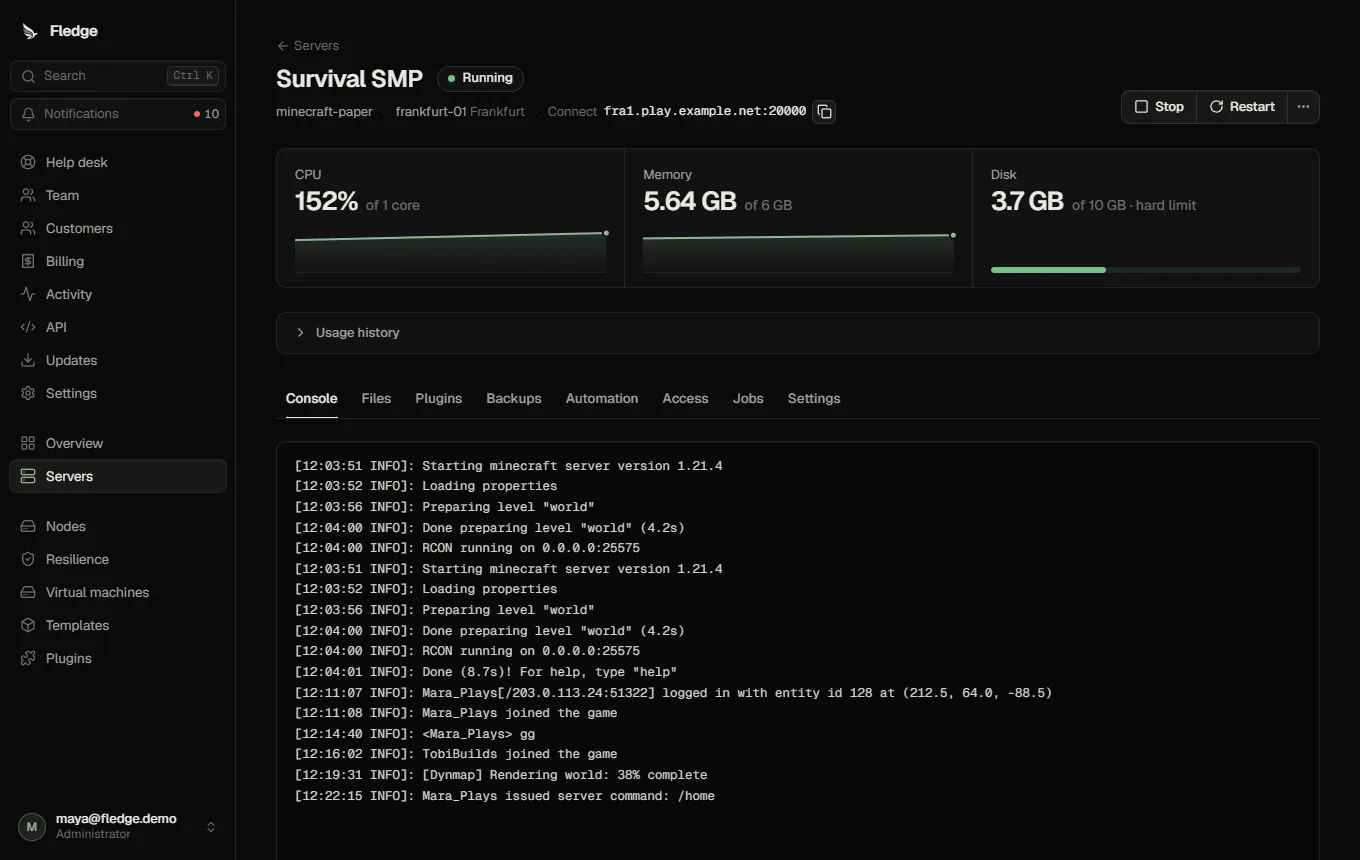
A live console that keeps its history, next to CPU, memory and disk for the server.
Fictional demo data. The panel also has a file manager, temporary SFTP logins, extra ports, cloning and a Startup page for template variables.
The hard parts, already handled.
Disk limits the kernel enforces
Each server gets its own volume, so a full disk stops writes instead of filling the host. Resize it from the panel.
How disk limits workBackups and failover
Verified backups to any S3-compatible storage, with retention. When a node goes offline, Fledge can rebuild its servers from the newest backup on another node.
Failover and movesAutopilot
Cron schedules with chained steps: command, wait, backup, restart. Crashed servers come back on their own, with crash-loop protection. Alerts go to Discord, Slack, webhooks or email.
SchedulesPeople and quotas
A super administrator delegates permission sets to the team. Customers get per-server collaborators and quotas on servers, memory, CPU, disk, backups and ports.
Team and permissionsSign-in that holds
Two-factor sign-in is mandatory for administrators. Passkeys, device sign-out, an admin network allow-list, scoped API tokens and an audit log you can export.
Security modelClone and move
Copy a server with or without its world, or move it to another node in a planned move when you need the room.
Clone a serverAn API under everything
Every endpoint is described in OpenAPI and documented on this site, alongside Prometheus metrics and webhooks.
API referencePlugins that can’t reach what they shouldn’t.
Plugin code runs in QuickJS compiled to WebAssembly, inside its own container, with no database credentials and no Docker socket. A plugin can only reach the hosts it declares, and you see every permission before you install it.
Four come with Fledge. The Modrinth Mod Browser covers Fabric, Quilt, Forge and NeoForge; the Modrinth Plugin Browser covers Paper, Purpur, Folia and Spigot; Stripe Payments accepts payments directly from your users; Better Discord Notifications turns alerts into colour-coded Discord embeds, for you and your customers. Search, review the dependencies, install, and the node checks each file’s SHA-512 before it lands.
fledge-plugin.json
{
  "id": "tiny-catalog",
  "apiVersion": 1,
  "permissions": [
    "network:downloads.example.org",
    "servers:read",
    "servers:files.write"
  ],
  "catalogs": [{ "id": "tiny", "kind": "mod" }]
}- Time per call
- 25 s
- Memory per call
- 64 MB
- Requests per call
- 40
- Outbound traffic
- HTTPS to declared public hosts
Run a hosting business on it.
Let people sign up, create servers within their limits, and buy preset servers by the month, quarter, half-year or year. Stripe is included; payments, late payments and cancellations are handled for you, and nothing is deleted unless you say so.
- Plans and a store. Fixed servers or allowances, trials, setup fees, stock, free tiers. Prices are read from your database at checkout; the browser only names a plan.
- Subscriptions that protect data. A late payment stops a server after the days you choose and starts it again when the money arrives. Billing never lifts a suspension you made, and never deletes by itself.
- Permissions per customer. One switch gives a single customer the right to create servers, or takes it away, whatever their plan says. Customers who may create get a short guide to their first server.
- Limits you can explain. Defaults, plans and per-customer overrides, with where each number comes from. Switch them off, or set them to warn only.
- Tell your Discord, beautifully. Crashes, offline nodes, failed payments and new sign-ups post to Discord, Slack or any webhook. The bundled Better Discord Notifications plugin makes them colour-coded cards with the cause and a link, for you and your customers, and nothing ever pings @everyone by accident.
- Built to survive bad days. Signed webhooks stored once and re-checked against the provider, a scheduled comparison that repairs anything missed, retrying email with a delivery log.
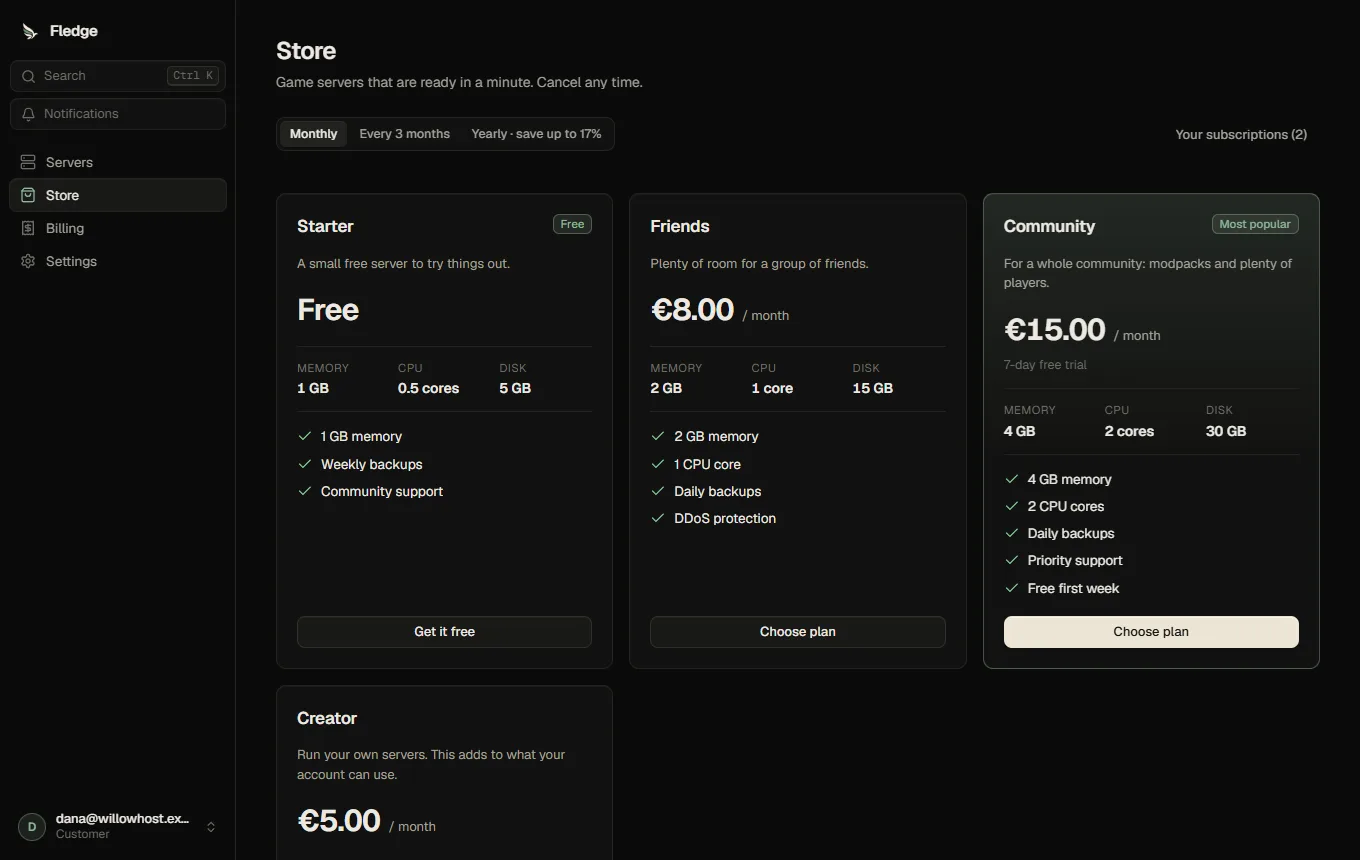
What a customer sees: plans with the price for the interval they pick, the size of the server and what is included.
A fictional hosting business on demo data, with Stripe’s test mode behind it. Tax, invoicing rules and consumer law remain your responsibility.
Help stays close.
Explore the help deskA conversation beside the server it concerns. Customers get tickets and a searchable knowledge base; your team gets assignments, private notes and response deadlines.
- Available when you need it. Enable the built-in help desk, choose who can use it, and connect an inbound email bridge if your team works by email.
- A clear account pause. Give customers a public explanation, a next step and an appeal route. Keep internal reasons private while access, billing and retention follow the hold.
- Keep the right people informed. Ticket replies, status changes and suspension events reach the panel and selected notification channels.
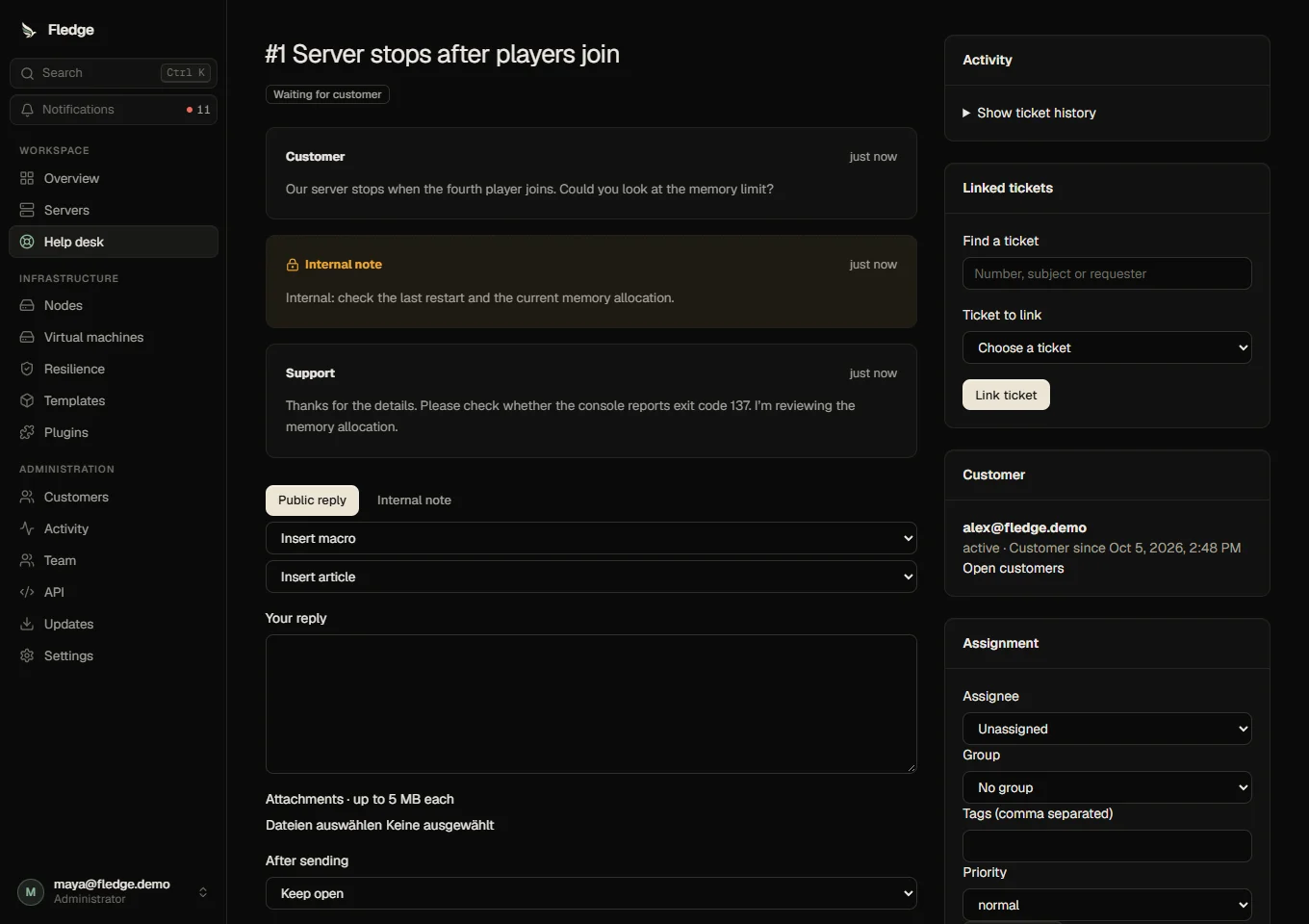
The shipped help desk, on a disposable demo account.
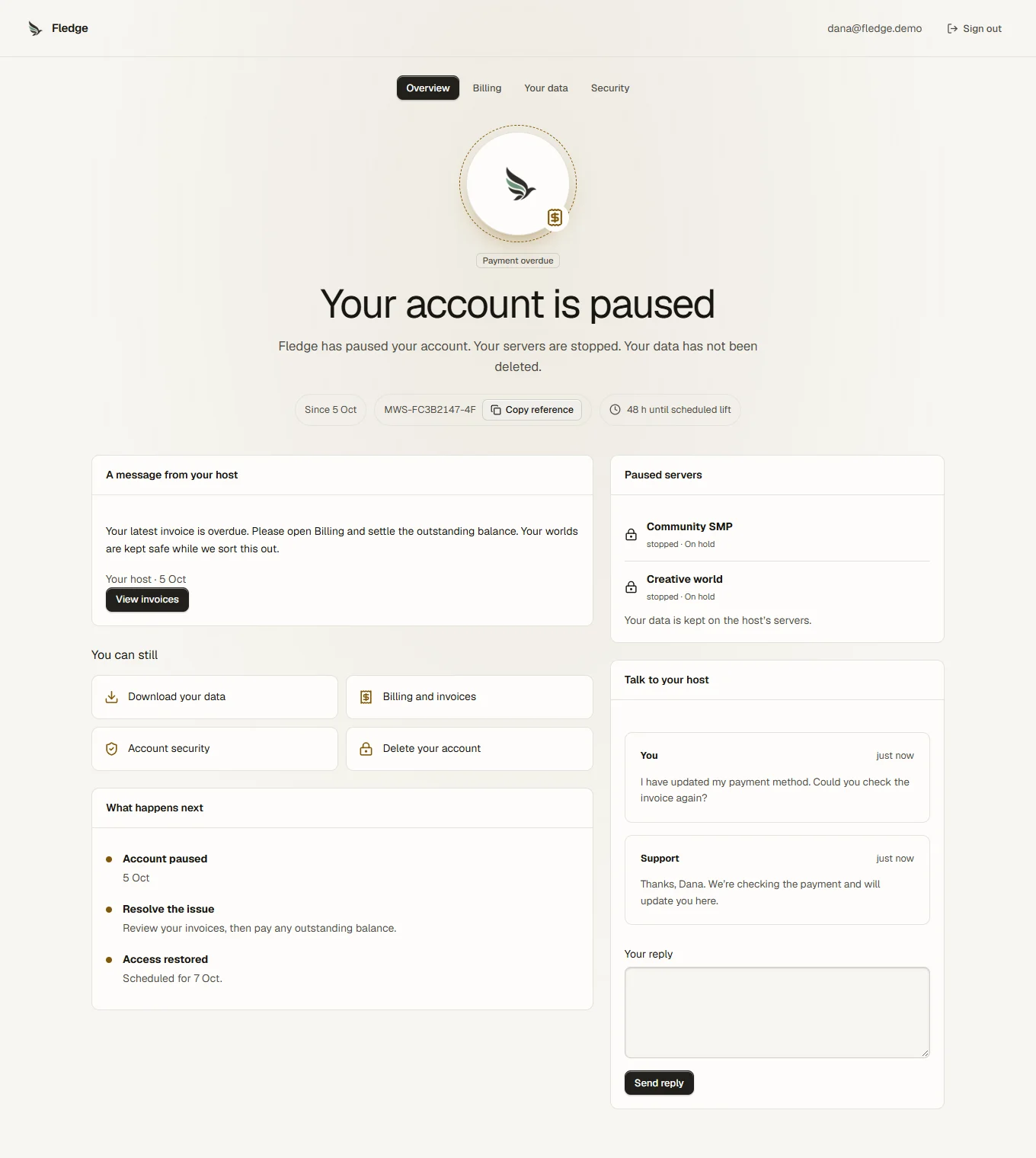
A pause with a next step.
The customer sees the explanation and permitted support or billing routes. Your team retains the history and controls when access resumes.
A whole machine.
In the same panel.
VM hosting guideRun KVM guests beside your Docker servers. Approved images, hardware profiles and networks give customers room to work within the limits you set.
- Install your operating system. Linux cloud images with SSH provisioning, or approved Linux and licensed Windows installation media.
- Get to the actual guest. Browser VNC and serial access, with reconnect, fullscreen and explicit clipboard controls.
- Keep recovery practical. Grow disks, configure allocated NAT ports or routed addresses, take stopped snapshots and restore complete guest bundles.
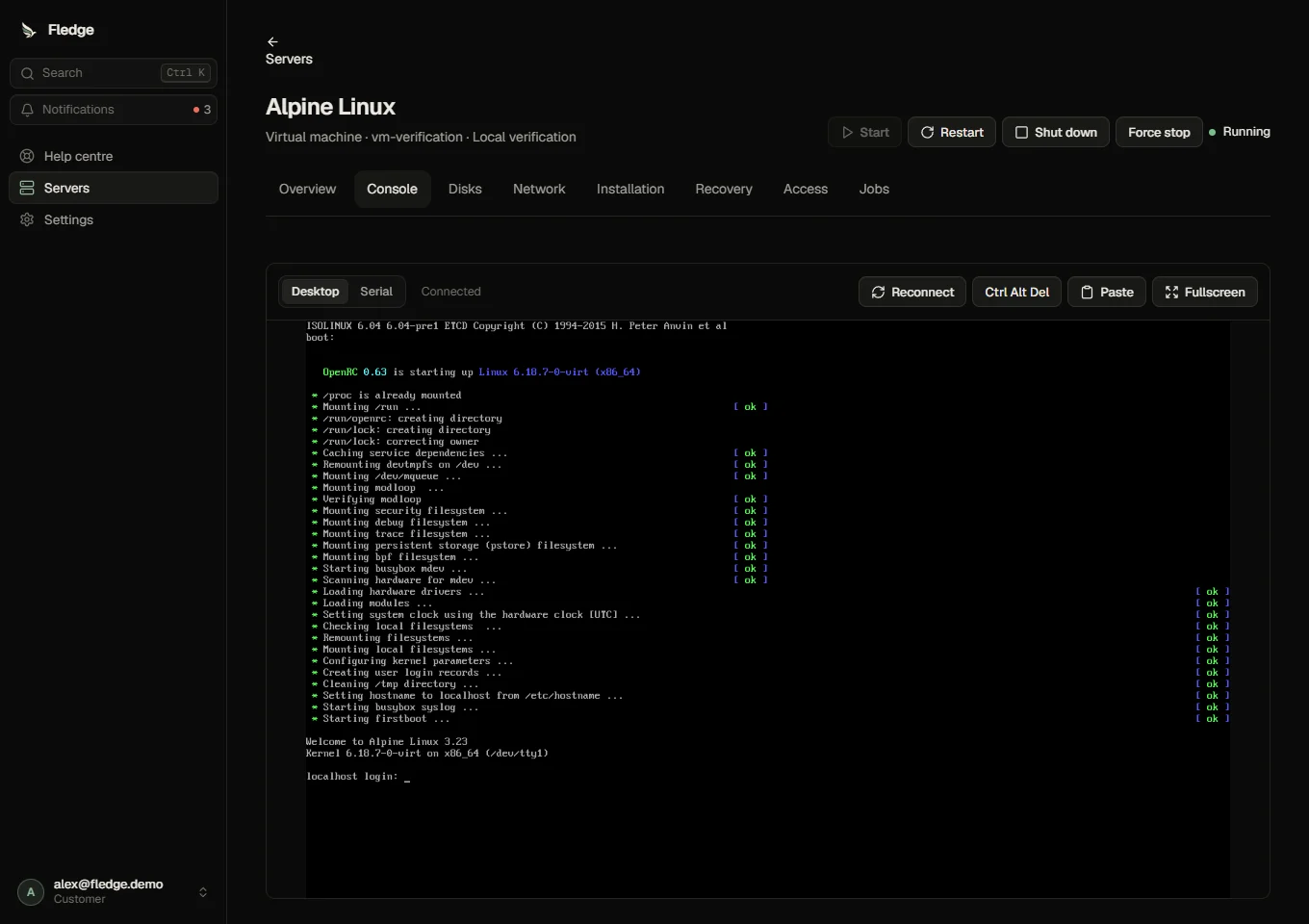
A real Linux guest. VM hosting is opt-in and requires a configured KVM/libvirt node.
Your name on the door.
Rename the panel, add your logo, pick colours and a font, and offer light and dark. Restyle the sign-in page, add links to the sidebar, show an announcement. It all happens in the browser, in Settings, Appearance.
- Readable by construction. Fledge works out every colour from your accent and checks each text pair as you edit. A theme that nobody could read cannot be saved.
- Try it for a minute. Put the draft on the real panel; it rolls itself back unless you keep it.
- Always a way back. The last 20 versions, a safe mode for the address bar, and one switch in
.envas a last resort.
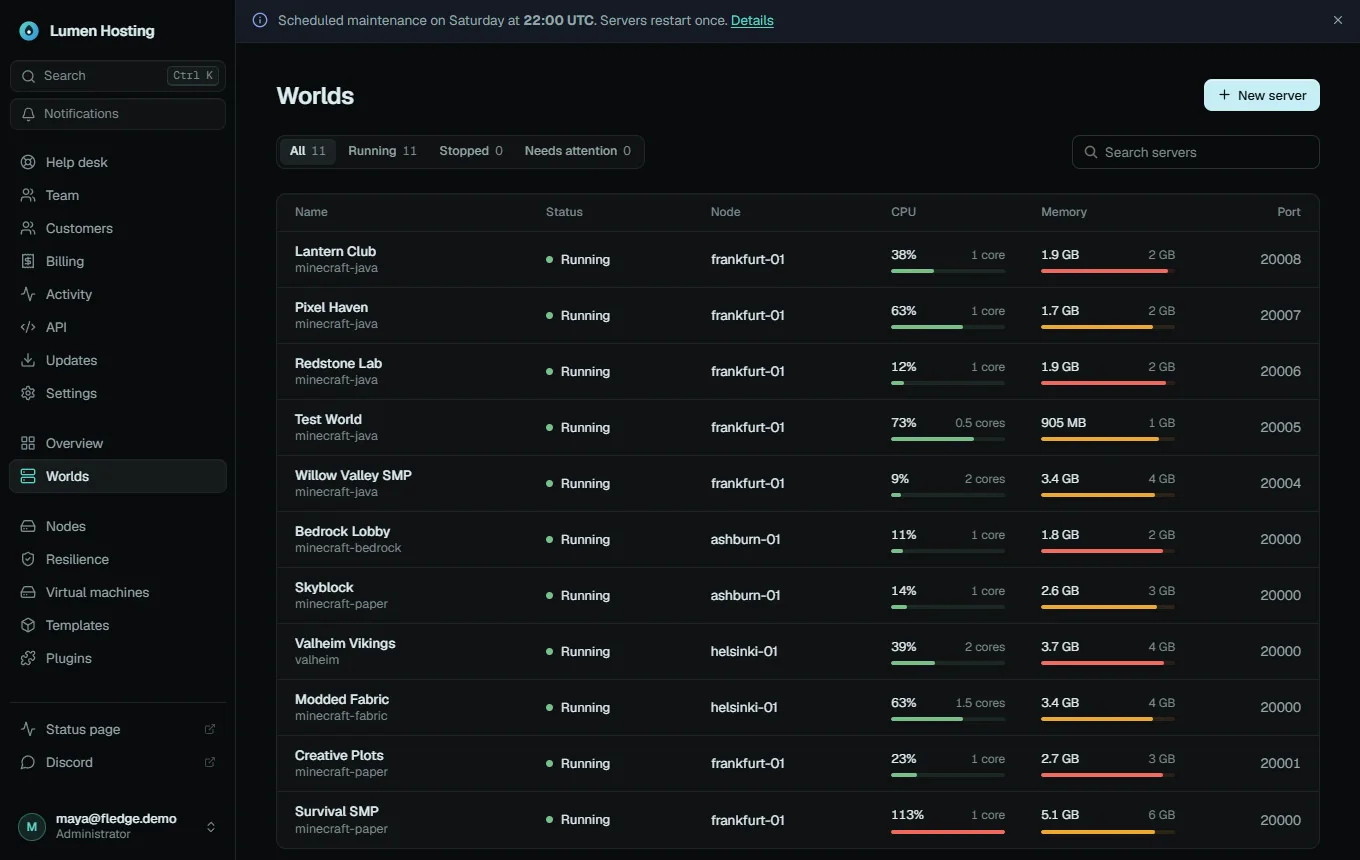
Lumen Hosting: its own logo, a teal accent, “Servers” renamed to “Worlds”, a status link and a maintenance banner.
Fictional brands on demo data. Your panel keeps a small “About Fledge” entry in the account menu; the licence and a link to the source stay visible.
Ready for the games you already run.
- Minecraft Java Paper, Purpur, Fabric, Forge, NeoForge
- Minecraft Bedrock
- Valheim
- Node.js, Python, Go, Bun, .NET
- Your Pterodactyl eggs imported as templates
Bring your worlds home.
Free and open source under the AGPL-3.0. Set it up on a spare machine tonight and connect your first node in minutes.
Fledge is in active development and suited to evaluation and controlled testing. It has not had a production security review. Status and known gaps