
The Stripe plugin
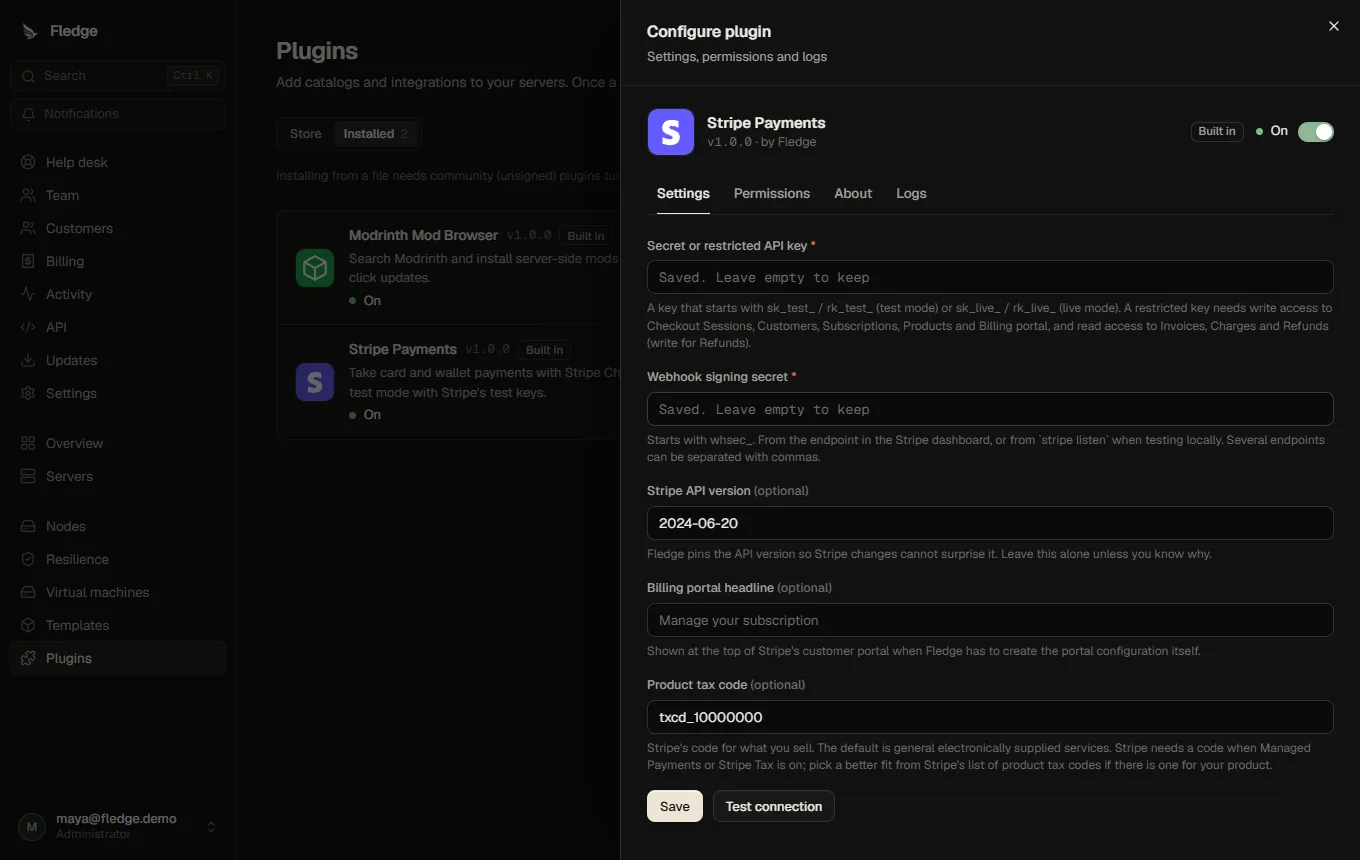
Stripe Payments ships with the panel (the bundled tier) and takes card and wallet payments for your plans through Stripe. Customers pay on Stripe's own pages; card details never reach Fledge.
How it works
- Checkout. Buying a plan creates a Stripe Checkout Session in subscription mode. The price is described inline in the request, so there are no products or prices to create in Stripe and nothing that can drift out of sync with your plans. Setup fees are a one-time line, trials are Stripe's trial days.
- Webhooks are only nudges. Stripe tells the panel something happened. The plugin checks the signature, Fledge stores the event, and then asks Stripe for the current state of the subscription or invoice. Duplicated, delayed or out-of-order events cannot corrupt anything.
- The customer portal (payment methods, invoice history) is Stripe's. The plugin creates the portal settings once if your account has none yet.
- Plan changes are done at Stripe with proration, and are refused rather than half-applied when the payment for the change fails.
- Refunds are made against the invoice's payment.
- The plugin can reach only
api.stripe.com(that is all it is allowed to ask for). It holds your Stripe key, so install only plugins you trust; this one is maintained with Fledge.
Set it up (test mode first)
- In the Stripe dashboard, turn on test mode and copy a secret key (
sk_test_…). For a restricted key, give it write access to Checkout Sessions, Subscriptions, Products, Customer portal and Refunds, and read access to Customers, Invoices and Charges. - In Fledge, open Plugins → Stripe Payments, approve its permissions, paste the key and (in the next step) the webhook secret, and switch the plugin on.
- In the Stripe dashboard, add a webhook endpoint at
https://<your panel>/api/billing/webhooks/stripewith these events:checkout.session.completed,checkout.session.expired,customer.subscription.*,invoice.*,charge.refunded,charge.dispute.*. Copy its signing secret (whsec_…) into the plugin. The address is also shown under Billing → Health. - In Settings → Billing, choose Stripe as the payment provider, then run Check now under Billing → Health. It shows the account name and test mode.
- Create a plan, open the store (readiness checklist), and buy it with a test card.
The panel must be reachable by Stripe over https for webhooks. Behind a reverse proxy that already works for browsers, it is.
Testing on your own computer
Install the Stripe CLI, run stripe login, then forward webhooks to your local panel:
stripe listen --forward-to localhost:4000/api/billing/webhooks/stripeThe command prints a signing secret (whsec_…) for the plugin. Test cards: 4242 4242 4242 4242 succeeds, 4000 0000 0000 0341 attaches but fails the next payment, 4000 0025 0000 3155 asks for 3-D Secure. Use any future expiry date and any CVC. To fast-forward renewals and failed payments without waiting, use test clocks.
Settings
| Setting | Meaning |
|---|---|
| Secret or restricted API key | sk_test_…/rk_test_… for test mode, sk_live_…/rk_live_… for live. Stored encrypted and never shown again |
| Webhook signing secret | whsec_…. Several endpoints can be separated with commas |
| Stripe API version | Pinned (default 2024-06-20) so Stripe changes cannot surprise Fledge |
| Billing portal headline | Used when Fledge has to create the portal settings |
| Product tax code | Stripe's code for what you sell (default txcd_10000000, general electronically supplied services). Stripe needs one when tax calculation or Managed Payments is on for your account |
Whether the key is test or live is read from its prefix and shown wherever money is involved. Fledge refuses to open the store while records from the other mode exist.
Going live
Create a live key and a live webhook endpoint, change the two settings, run Check now, and look for Live: real money under Billing → Health. If you tested before, use Health → Remove test-mode records to clear the test subscriptions first. The full list is in Going live.
Things to know
- Managed Payments. Stripe may make itself the seller of record on new accounts. That changes who handles tax and invoices and needs newer API versions than the one Fledge pins, so Fledge turns it off for its checkouts. If you want it, sell through Stripe's own tools instead.
- Tax. Switch on Calculate tax automatically in the store settings only after setting up Stripe Tax and your tax registrations.
- Currencies. The currency is chosen per price; Stripe must support it for your account.
- One webhook endpoint per Fledge panel. The same account can host other products; Fledge ignores subscriptions that did not come from one of its orders.
- Versions. Fledge was verified against the real Stripe API in test mode; see Tests.
For plugin authors
Stripe is the first plugin to use the payments contract.