
Billing and subscriptions
Billing (administrators) is where you see the money and the subscriptions behind it. The area appears in the sidebar once a payment provider is chosen, a plan exists or the store is open. Customers have a Billing page of their own.
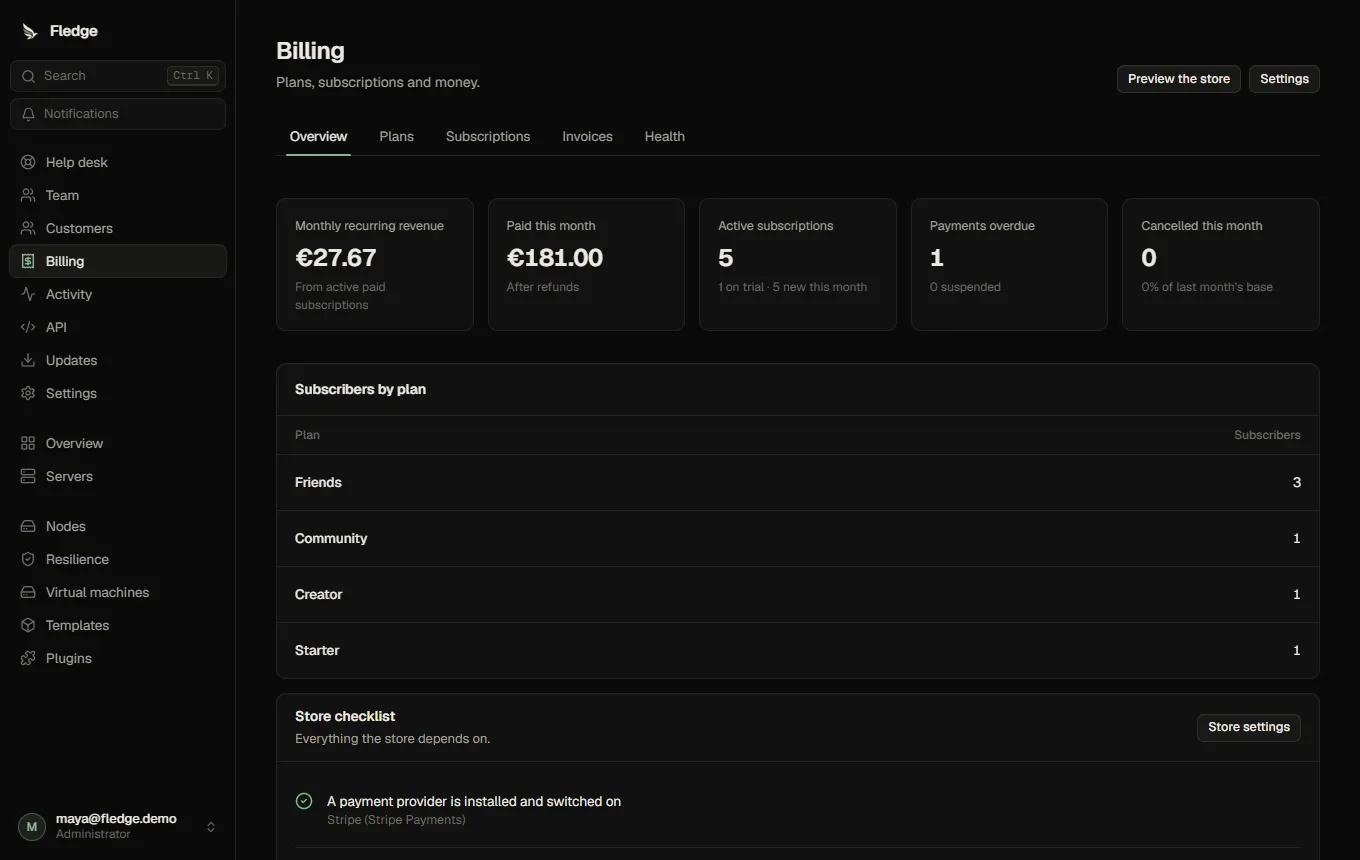
| Tab | What it shows |
|---|---|
| Overview | Monthly recurring revenue, what was paid this month, active subscriptions and trials, overdue payments, cancellations; the checklist for opening the store |
| Plans | Plans and prices |
| Subscriptions | Everyone's subscriptions, searchable by email and filterable by status; click one for its detail |
| Invoices | A mirror of what the provider issued, with a CSV export |
| Health | The provider connection, payment events and what needs attention |
Who may buy, cancel or create servers is explained in Customer permissions.
The life of a subscription
Status changes happen in one place, follow a fixed table of allowed moves, and are all recorded with their cause in the subscription's timeline. A late, duplicated or out-of-order message from the payment provider can never move a subscription somewhere it should not be.
| Status | Meaning | The server |
|---|---|---|
| Starting | Checkout started, not paid yet | Does not exist |
| Trial | Inside a free trial | Running |
| Active | Paid up | Running |
| Payment overdue | A renewal failed; the provider is still retrying | Running; the customer is emailed |
| Suspended | Overdue for the suspension time | Stopped and held (not deleted) |
| Ended | Cancelled and the paid period is over | Stopped and held; kept for the retention time |
| Removed | Deleted after retention (only if you turned that on) | Deleted after a last backup |
A payment brings a suspended subscription back to active by itself and starts the server again, but only a hold that billing placed is lifted. A server you suspended yourself stays suspended, whatever the customer pays. Nothing is ever deleted because of billing unless you turn Delete servers that stay unpaid or cancelled on.
When a payment fails
The defaults, all changeable under Settings:
| Day | What happens |
|---|---|
| 0 | The customer is emailed; administrators are notified; the server keeps running |
| 3 and 14 | Reminders (the later one is a final warning once the server is suspended) |
| 7 | The server is stopped and held; the customer is emailed |
| 30 | Only with automatic termination on: the server is deleted, after a final backup |
These steps run from a timer against the day the payment went overdue, not from messages, so a restart or a missed message cannot skip one.
Cancelling
Customers cancel at the end of the paid period (they keep access until then and can change their mind). You can end a subscription at the period end or immediately. When it ends, the server is stopped and kept for the retention time (30 days by default; each plan can differ). Subscribing again before then gets the data back. With automatic termination off, ended servers wait for you: Billing health and a notification remind you, and Delete server… on the subscription removes one (after a last backup when backups are on).
A subscription's detail
Click a row under Subscriptions.
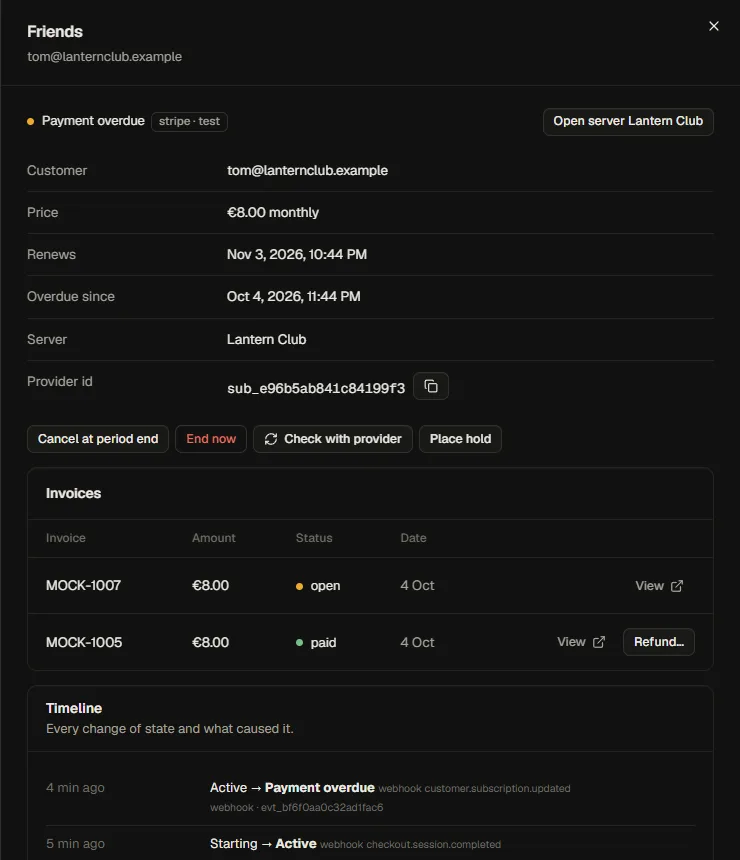
- Cancel at period end, End now, Resume.
- Check with provider reads the subscription from the provider again and fixes anything that differs.
- Place hold keeps the server stopped whatever the customer pays (abuse, investigations); Release hold undoes it.
- Delete server… for ended or suspended subscriptions.
- Refund… on a paid invoice (a part or all, optionally ending the subscription too).
- Invoices with links to the provider's hosted invoice, and the timeline.
Giving plans away
Give a plan (or a customer's page → Plans) grants any plan without payment, optionally until a date, with a private note. A complimentary subscription behaves like a paid one: a server plan creates its server, an account plan raises limits, and at the end date the server is stopped and kept. Change the end date later, or remove it. Use it for staff, partners and migrations. New accounts can also receive a free plan automatically (Sign-up).
Changing plan
Customers (and you) can move between plans of the same kind. The provider prorates the money. For a server plan the server is resized to the new plan: upgrades apply at once, a restart is announced in the preview. A move to a smaller plan is refused if the new disk is smaller than what the server uses, and you can turn off downgrades altogether. A change that the node cannot hold is refused before the provider is told anything. Different templates cannot be swapped: buy a new subscription.
Disputes and refunds
A customer disputing a payment with their bank stops the server (switchable) and notifies you. Winning the dispute releases it; losing it ends the subscription. Refunds are made through the provider and appear on the invoice; the customer is emailed.
When the server cannot be created
Payment can succeed while no node has room at that moment. The subscription is active, the customer sees "We're setting this up", is emailed, and you are notified. Fledge keeps trying for 24 hours (changeable), with growing pauses. You can try again by hand, or Refund and cancel. A setting lets Fledge refund and cancel by itself if it still fails after the retry time; the default is that you decide. Checkout never starts for a plan that has no room, so this is rare.
Test mode and live mode
Every record knows whether it was made in the provider's test mode. Fledge refuses to open the store while subscriptions from the other mode exist, so test and live money never mix. Once the provider is in live mode, Health → Remove test-mode records deletes test subscriptions, orders and invoices (after you type a confirmation; live records are never touched).
Settings
Settings → Customers, store and email → Billing:
| Setting | Notes |
|---|---|
| Payment provider | A payment plugin (the Stripe plugin ships with the panel) |
| Default currency, accepted currencies | Three-letter codes |
| Reminder emails on day, Suspend the server after | The late-payment schedule above |
| Delete servers that stay unpaid or cancelled | Off by default. On adds Delete unpaid servers after and Keep cancelled servers for days |
| Take a last backup before deleting | On by default |
| A dispute stops the server | On by default |
| What customers may do | Cancel, resume, change plan, move to a smaller plan, and whether cancelling can be immediate |
| Renewal reminder, trial-ending notice | Days before; 0 turns them off |
| Tell administrators about problems, Allow giving plans without payment | |
| Checkouts per customer and hour, stock held by unfinished checkouts, retry window, compare with the provider every | Safety knobs |
| If a paid server can never be created | You decide, or refund and cancel automatically |
Health
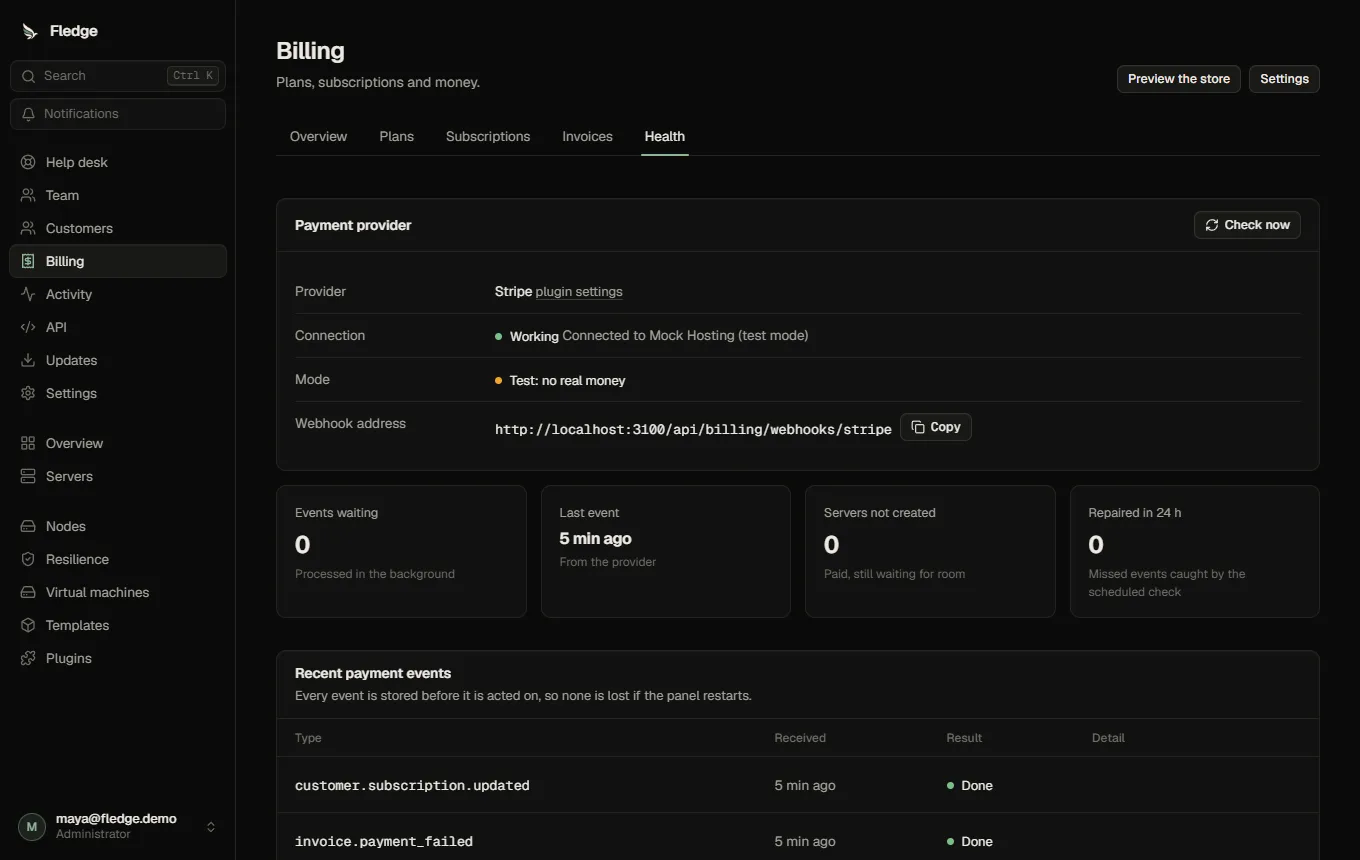
The Health tab shows whether the provider answers, its mode (test or live), the webhook address to give the provider, and the recent payment events with their outcome. Every event is stored before it is acted on and processed with retries, so a restart loses nothing; Process again re-runs one. A scheduled check (every 15 minutes by default) compares each subscription with the provider and repairs anything a missed notification left behind, noting how many repairs it made in 24 hours. See Recovering from billing problems.
What customers see
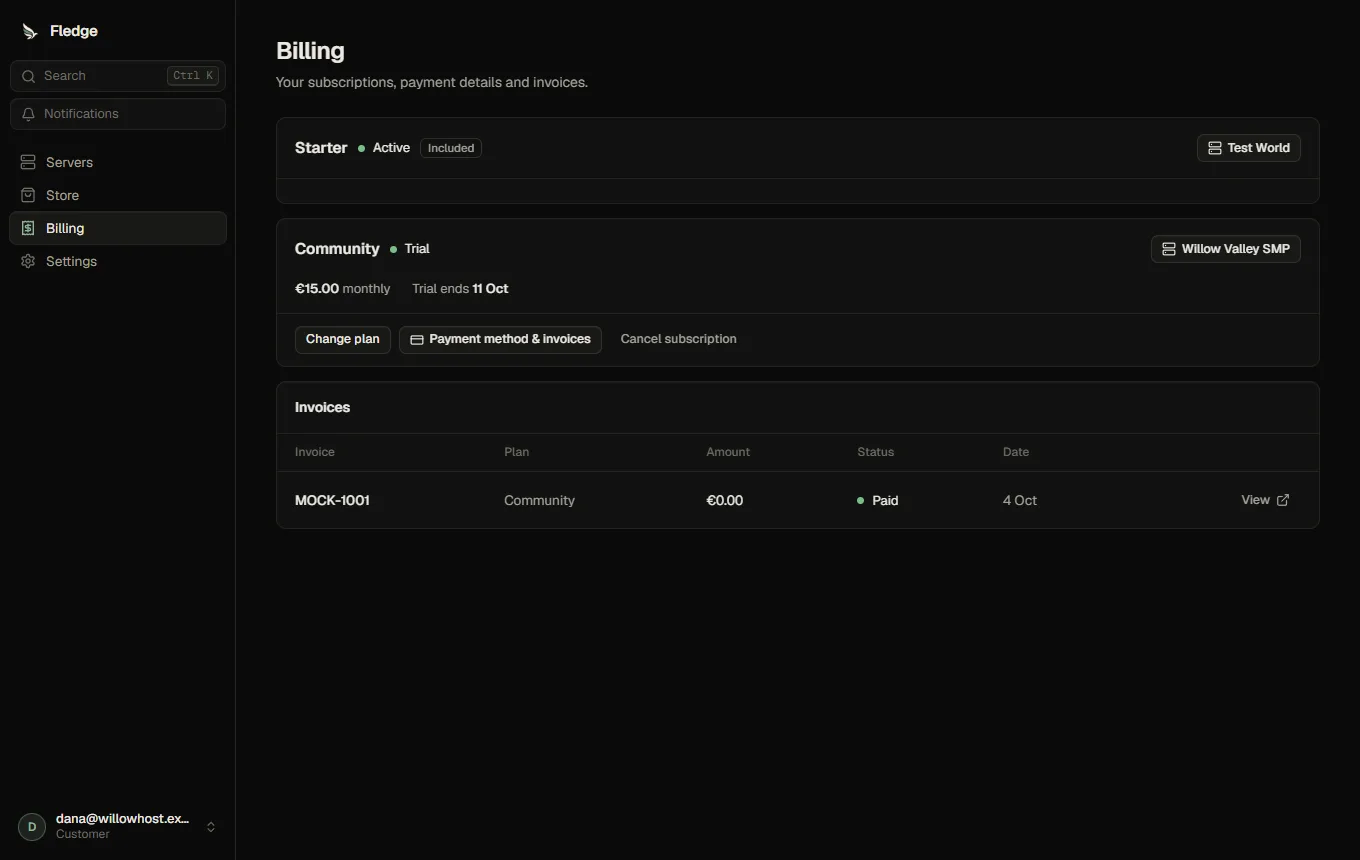
Their subscriptions with status, price, renewal or end date and the server; a clear banner for an overdue payment (with the date the server will be stopped) or a suspended server and a Pay now button; Change plan with a preview of what it does; Cancel subscription; Payment method & invoices (the provider's page); and a table of invoices.
API
Customer: GET /api/billing, POST /api/billing/portal, POST /api/billing/subscriptions/:id/cancel|resume|change, GET /api/billing/preview-change. Administrator: /api/billing/admin/subscriptions…, /api/billing/grants, /api/billing/overview, /api/billing/invoices, /api/billing/health, /api/billing/events. Payment providers call POST /api/billing/webhooks/:provider. See the API reference.
Account holds
The default late-payment action still holds the affected server. The optional whole-account switch pauses the customer with an explanation and lifts after overdue payment is settled. Account, billing and administrator server holds are released independently; the last applicable hold controls restarting. Paid fulfilment waits through a suspension. A suspended payment portal must disable plan changes; unsupported providers leave invoice payment available instead. See Suspension.