
Limits
Limits decide what a customer may own. They are checked wherever something is created or made bigger, inside the same transaction as the change, so simultaneous requests cannot slip past them. Settings → Customers, store and email → Limits controls them; a customer's own page can override them.
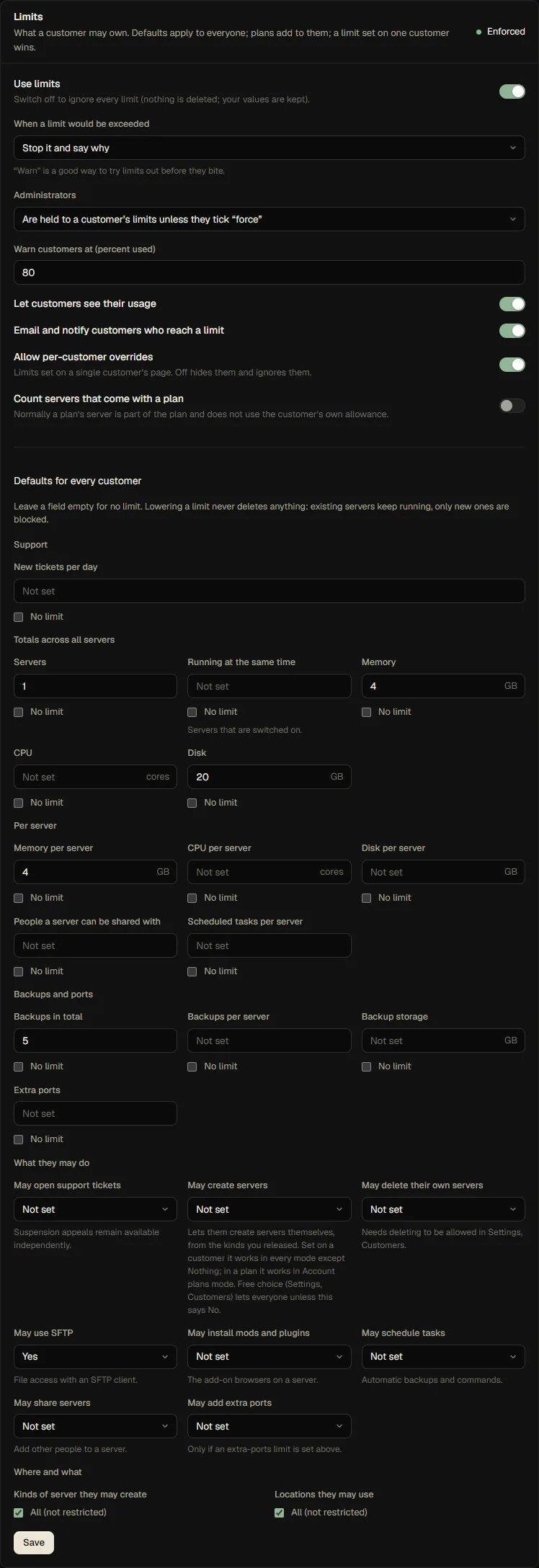
Switching them on, off or to "warn"
| Setting | Meaning |
|---|---|
| Use limits | The master switch. Off ignores every limit everywhere. Your numbers are kept. On after an upgrade, so limits you already set keep working |
| When a limit would be exceeded | Stop it and say why, or allow it but tell the customer and the administrators. "Warn" is a safe way to try limits out |
| Administrators | Held to a customer's limits unless they tick force (the default), or always allowed to exceed them |
| Warn customers at | The percentage used at which a customer is notified (once every three days per limit) |
| Let customers see their usage | Show the usage bars to customers |
| Email and notify customers who reach a limit | Off keeps it quiet |
| Allow per-customer overrides | Off hides and ignores limits set on a single customer |
| Count servers that come with a plan | Normally a server from a server plan belongs to the plan and does not use the customer's own allowance |
Lowering a limit never deletes anything: servers already above it keep running. Only new creations are blocked, and the customer sees "over limit".
What can be limited
| Limit | Applies to |
|---|---|
| Servers; running at the same time | Total number; servers that are switched on |
| Memory, CPU, disk | Totals across all of the customer's servers |
| Memory, CPU, disk per server | The largest a single server may be |
| Backups in total; per server; backup storage | Count and size |
| Extra ports | Total |
| People a server can be shared with; scheduled tasks | Per server |
| Kinds of server; locations | Which templates and which locations they may use |
| Yes/no: create servers, delete their own servers, SFTP, mods and plugins, scheduled tasks, sharing servers, extra ports | Whether they may |
A number is a cap, No limit is a decision of its own, and an empty field means "not set here, look at the layer below".
Three layers
Every customer's effective limits come from three layers. From the bottom:
- Defaults for every customer (this card). Empty means no limit, exactly like before.
- Their plans. Account plans add to the defaults. Totals add up (default 2 servers + a plan with 5 = 7), per-server maxima and lists use the most generous layer, and a yes from any plan can grant a capability. A plan limit still applies when there is no default. For server creation, the Account plans self-service mode additionally requires an explicit May create servers grant, on an account plan or on the customer (Customers, Edit limits); a default alone never qualifies.
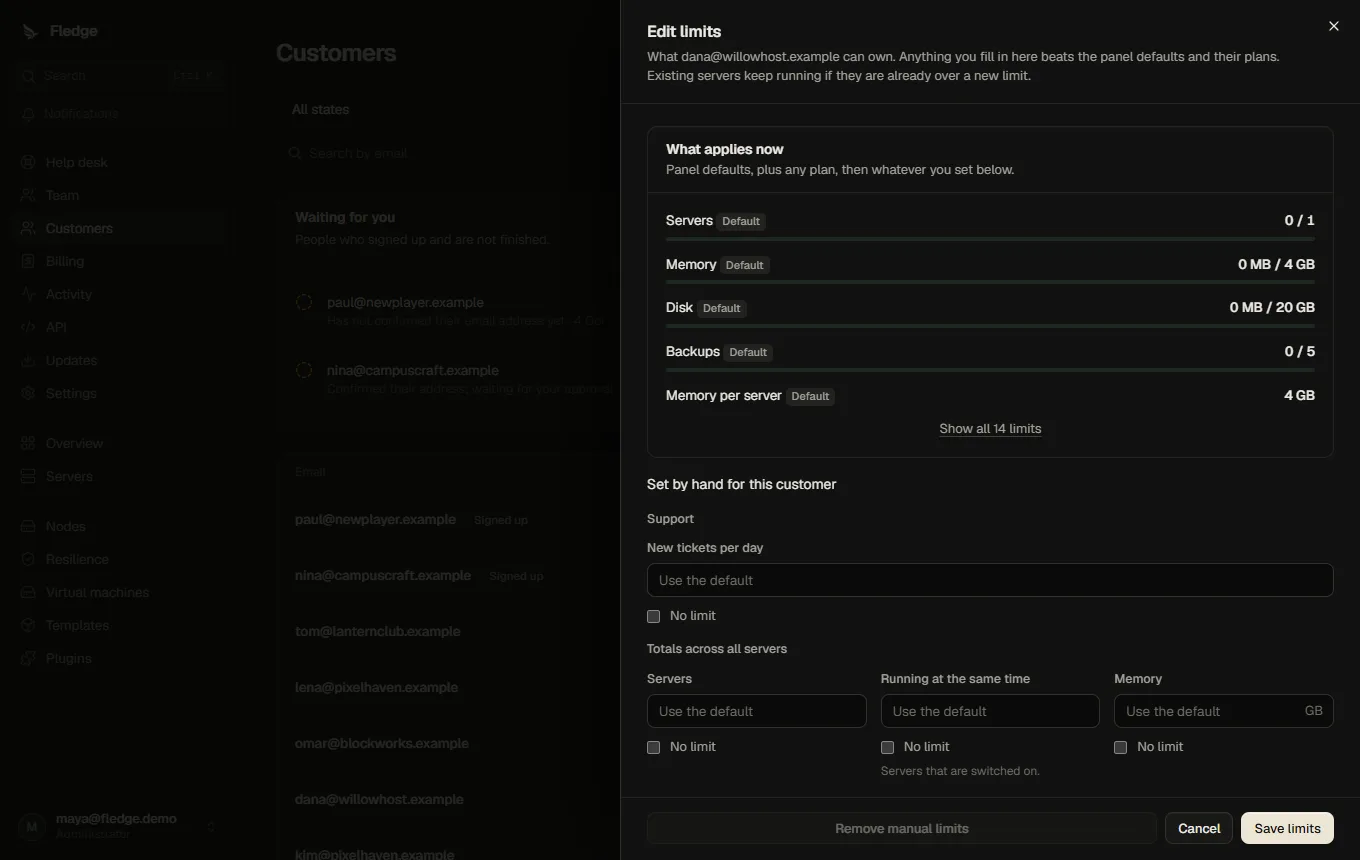
- Set by hand on the customer's page. An explicit value, including "No limit", always wins. This is what the old quotas were; they are read as this layer unchanged.
The customer page shows the result with where each number comes from (Default, the plan's name, or Set by your host), so you never have to guess.
The master Use limits switch and Warn mode retain their usual behavior. When limits are disabled or set to warn, limit denials are bypassed; the Account plans creation mode still requires a live account-plan grant. A customer-level May create servers: No override takes precedence while limits are enforced.
Servers that come with a plan
A server created by a server plan is governed by that plan: its size is fixed, and it does not use the customer's own allowance. Otherwise buying "Minecraft 4 GB" would eat the allowance and block the next purchase. They still count towards the capacity of the node.
Where limits are checked
Creating a server (by an administrator, a customer or the store), resizing, cloning, starting a server (running limit), creating a backup, adding an extra port, sharing a server, creating a schedule, using SFTP and installing add-ons.
Errors say what and how much: This would exceed the limit of 2 servers (2 in use, 1 requested).
Examples
A free tier plus paid plans. Defaults: 1 server, 2 GB memory, 10 GB disk, no extra ports. A "Creator" account plan adds 5 servers and 16 GB. A customer with the plan can have 6 servers and 18 GB; one without it is held to the free tier.
Selling only fixed servers. Defaults: 0 servers. Customers cannot create servers themselves; they buy server plans, whose servers are not counted.
Account-plan server access. Set self-service to Account plans, release a template with fixed resource defaults, and enable May create servers on an account plan. Only customers with a trialing, active or past_due subscription to a granting account plan can create. A customer-level denial still blocks creation. Ending or suspending the subscription removes the grant but does not delete servers already created; the remaining limits apply to later actions.
A trusted friend. Set "No limit" on their page for servers and memory.
API
GET /api/limits/me, GET /api/customers/:id/limits (administrators), and the quota field of PATCH /api/customers/:id. The names maxServers, maxMemoryMb, maxCpuPercent, maxDiskMb, maxBackups and maxExtraPorts are unchanged; the new limits use the names in the table above (for example runningServers or maxServerMemoryMb). See the API reference.