
Customers creating servers
Until now only administrators created servers. Settings → Customers & billing → Server access lets customers create servers in one of three ways. It is off by default.
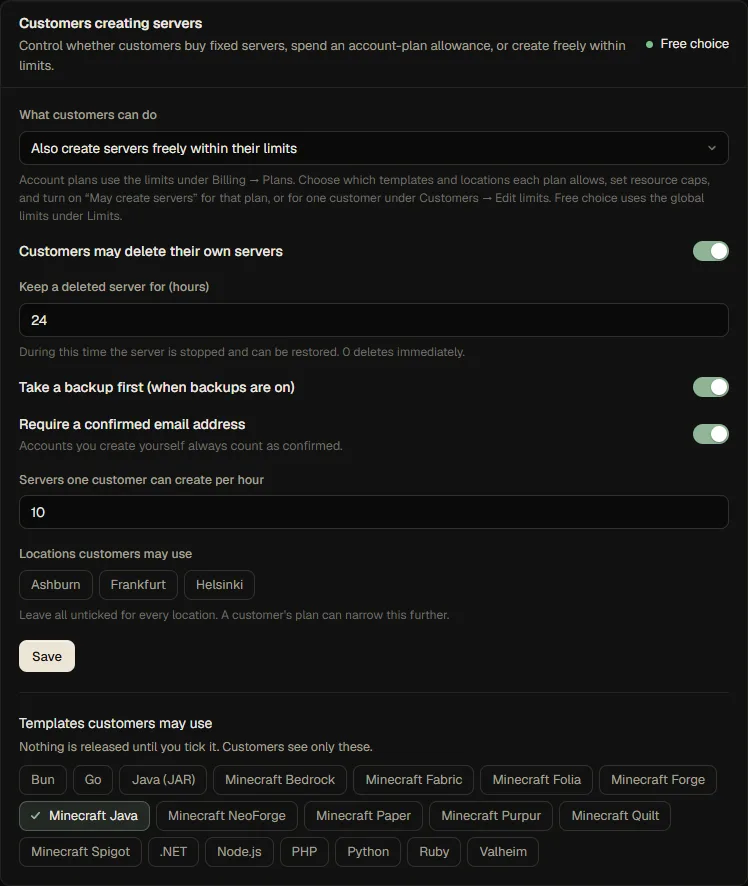
| Mode | What customers can do |
|---|---|
| Off (default) | Nothing: only administrators create servers |
| Server plans | Buy a fixed server from a server plan, or claim a free one. Self-creation only for customers you grant it to (see below) |
| Account plans | Create fixed-size servers while an active account plan allows it, or when you grant it to the customer |
| Free choice | Create servers without an account-plan grant, choosing size within their limits |
Account-plan creation
- Create an account plan under Billing → Plans and set its allowance. Enable May create servers on that plan; an account plan without that explicit grant does not unlock self-creation.
- Release the templates customers may use and add a short description. Select allowed templates and locations in the plan's limits; customers can use only the intersection of those and the panel-wide choices.
- Set fixed resource sizes on each released template. In this mode customers cannot submit custom memory, CPU or disk values. Their effective limits, node capacity and per-hour creation rate are still checked.
- Set Settings → Customers, store and email → Customers creating servers to Account plans. The customer must have a
trialing,activeorpast_dueaccount-plan subscription with the grant. A payment grace period keeps access; canceled, suspended and terminated subscriptions do not.
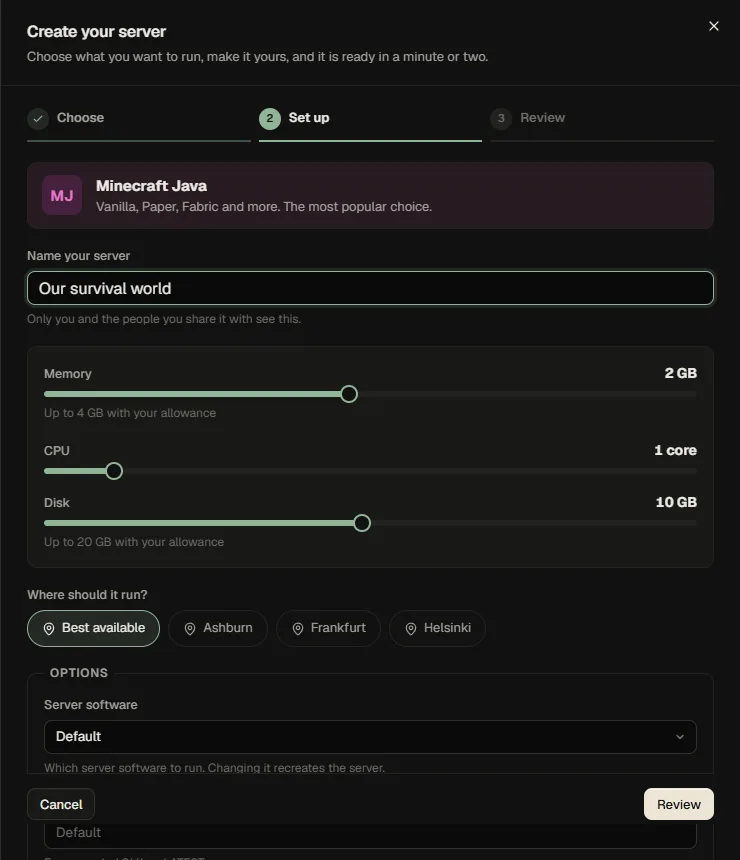
Customers with the grant get New server on the Servers page. They choose a released kind, an allowed location and the settings the template lets people change. Resources use the template's fixed defaults; turn Customers may rename their servers off to use the published template name. A customer-level May create servers: No override can still block creation. The server is placed exactly as an administrator's would be (capacity, free ports, real free disk), in the same transaction as the limit check, so two clicks at once cannot exceed a limit. If there is no room, the customer gets a plain "no capacity right now" and never sees which nodes exist.
An account-plan grant does not make created servers subscription-owned: they remain the customer's own servers. Ending the plan removes its allowance and creation permission, but does not delete servers. Existing servers keep running; subsequent actions that exceed remaining limits are subject to the configured limits policy.
Letting one customer create servers
Open Customers, choose the customer, Edit limits, and set May create servers to Yes. That customer gets the New server button at once, whatever the plan, in every mode except Off (in Server plans and Account plans they create fixed-size servers from the released templates; in Free choice everyone already can). Set it to No to take the right away from one person; a No always wins over a plan's Yes. The customer's allowance, locations and per-hour rate are still checked. The panel explains to customers who cannot create why not and points to the store.
The create-server guide
Customers who may create servers and have none see a short welcome on the Servers page. New server opens a three-step guide: Choose the kind of server (cards with a short description and the size), Set up (name, location, and sliders for memory, CPU and disk in Free choice, limited by what is left of their allowance) and Review (what is created and what it uses of the allowance). With only one kind released the first step is skipped.
Free choice
Set the mode to Free choice to let customers create without an account-plan permission. Release templates, choose the allowed locations and configure safe default limits (for example, one server plus memory and disk caps). Customers choose memory, CPU and disk subject to those limits and per-server caps. The node-capacity check still protects machines, but limits are the important guardrail for other customers.
Other rules:
- The account must be active and, for people who signed up themselves, have a confirmed email address (administrator-created accounts count as confirmed).
- A customer can create at most 10 servers an hour (change it).
- Customers only see templates you released; their plan can narrow the list and the locations further.
- In Free choice, a plan can switch the right off (May create servers: No). In Account plans, a plan must explicitly grant it, and a customer-level denial still takes precedence.
Deleting a server
With Customers may delete their own servers on, the owner (not people the server is shared with) gets a Delete button in the server's settings.
- Servers that belong to a subscription are not deleted here: they are removed when the subscription ends. The button explains this and links to Billing.
- By default the server is stopped and kept for 24 hours, shown as "Deleting soon", and the owner can bring it back with one click. Set the time to 0 to delete immediately.
- When backups are on, a backup is taken first (unless the owner already has one from the last hour). A failing backup, for example because of a backup limit, never blocks a deletion the customer asked for.
- Everything is in the audit log.
What administrators still do
Administrators create servers as before, from Servers → New server, for any customer, and are not bound by the customer rules. A customer's limits still apply to them unless they tick force (or you set limits to let administrators always exceed them).
API
GET /api/me/servers/options, POST /api/me/servers, DELETE /api/me/servers/:id (with {"confirm": true}), POST /api/me/servers/:id/restore, PUT /api/templates/:id/store. Customers use their browser session; API tokens cannot create servers for customers. See the API reference.