
Templates
A template describes a kind of server. Templates (administrators) lists the official ones (Minecraft Java and its variants, Bedrock, Valheim and more) and your custom ones.
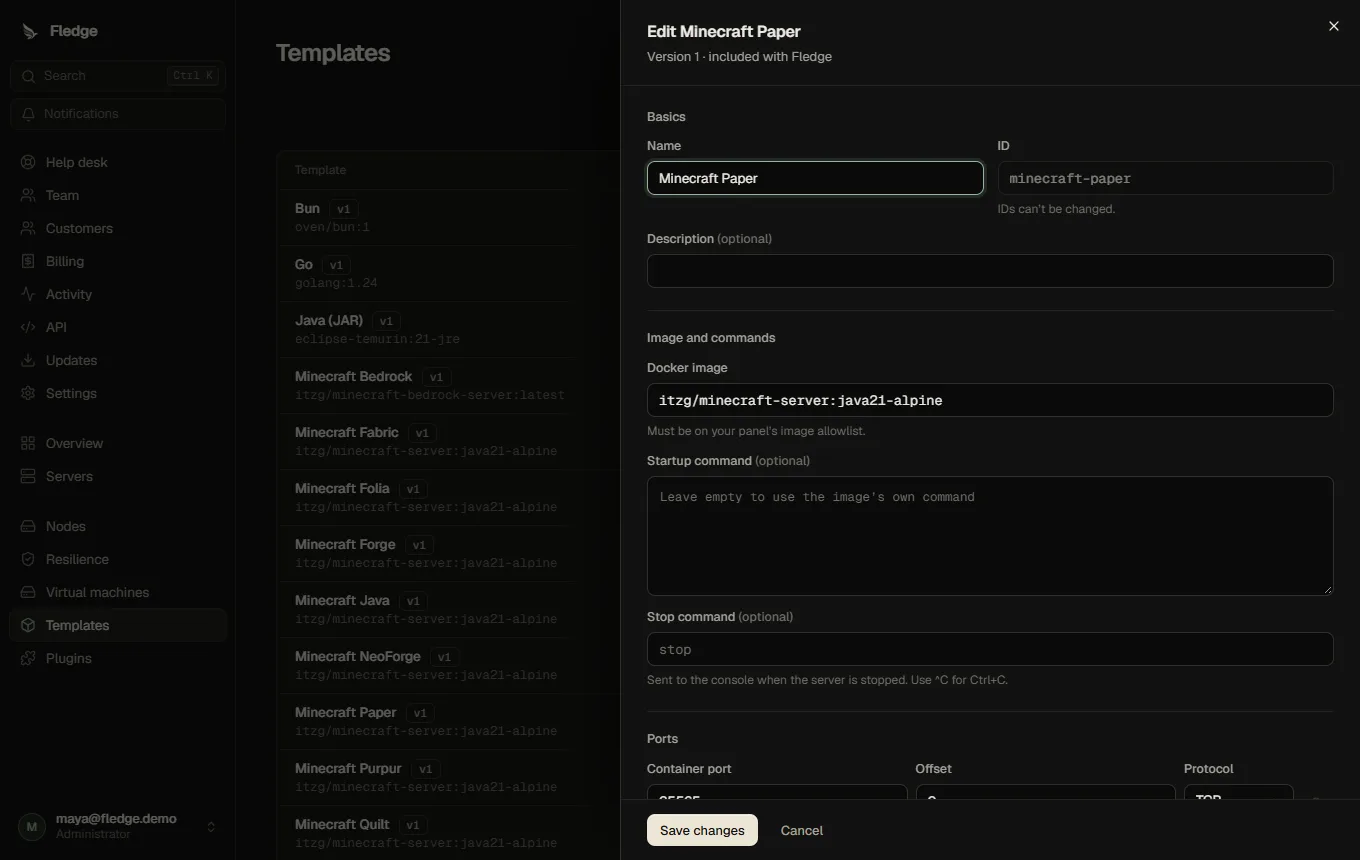
Fields
| Field | Meaning |
|---|---|
id, name | Identifier (lowercase, digits, hyphens) and display name |
image | Docker image. Must match an allowed image prefix |
startup | Optional command; replaces the image entrypoint with /bin/sh -c on the node |
stopCommand | Optional console command used to stop gracefully |
internalPorts | [{container, offset, protocol}]; the host port is the server's base port plus offset |
env | Default environment values |
variables | Typed variables owners may edit |
memoryMb, cpuPercent, diskMb | Default resources |
addons | Add-on rules for mod and plugin catalogs |
Variables
Variables turn environment values into settings with proper inputs and validation. Each has a key (CAPITAL_LETTERS), label, optional description, a type, userEditable, required and secret.
| Type | Extra options |
|---|---|
string | pattern (regular expression, up to 200 characters; evaluated with a time limit) |
number | min, max |
boolean | rendered as an on/off switch |
select | options: [{value, label}] |
secret: true hides the value from non-administrators. A template may declare at most 40 variables. The older editableVariables list still works and appears as plain text fields. See also the generated template variable types.
Versions
Every change to the image, startup, stop command, ports or environment creates a new version. Servers remember the version they were created or last updated with. Update servers (on the template) lists which servers are outdated and what would change; applying recreates their containers (a stopped server stays stopped). A change to the port layout cannot be applied automatically; those servers need to be recreated by hand.
Import, export and Pterodactyl eggs
- Export a template as JSON and import it elsewhere.
- Pterodactyl egg conversion imports environment defaults, editable variables, the startup command (double-brace placeholders become
${VAR};SERVER_MEMORY,SERVER_PORT,SERVER_IPare mapped) and the stop command. It does not run install scripts or Pterodactyl images; review the generated image, ports and warnings before saving.
Add-on rules
To let a template use the Mods or Plugins tab, set Add-on support:
{
  "typeVar": "TYPE",
  "versionVar": "VERSION",
  "types": {
    "PAPER":  { "kind": "plugin", "dir": "/plugins", "loaders": ["paper", "spigot", "bukkit"] },
    "FABRIC": { "kind": "mod",    "dir": "/mods",    "loaders": ["fabric"] }
  }
}
typeVar and versionVar name the variables that hold the server type and Minecraft version. The server's type picks the rule; kind selects which catalog plugins apply (a catalog declares the kinds it serves), dir is the folder under the server's data directory, and loaders is what the catalog filters by. Types without a rule do not get the tab.
Customers and templates
Customers see templates without commands or environment values. Only administrators can create, edit, import and delete templates; a template in use cannot be deleted.